Geo-routed
Send buyers to a different checkout based on the country they're in, from a single share link.
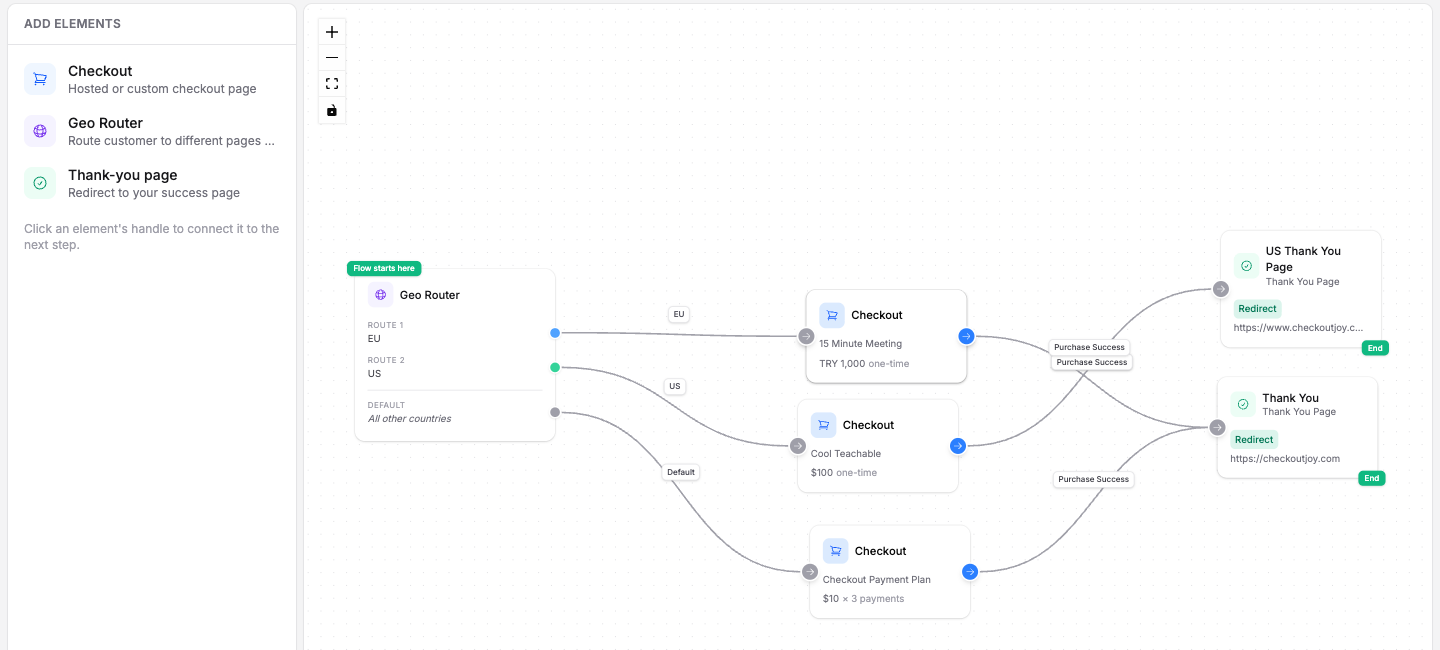
A geo-routed checkout sends buyers to a different checkout based on the country they're in. You share one link, and CheckoutJoy detects the buyer's country and routes them to the checkout you've assigned.
This lets you offer the right processor, currency, and pricing per region.
For example, you can route your local customers to a checkout priced in their local currency, and international customers to a checkout priced in US Dollars.
- South African buyers → a PayFast checkout priced in Rands (ZAR).
- All other buyers → a PayPal checkout priced in USD + EUR + AUD.
For a full walkthrough of this exact setup — Kajabi with PayFast for South African buyers and PayPal for everyone else — see the Kajabi geo-routing tutorial or watch the video tutorial.
How it works
A flow is built from three elements:
| Element | Purpose |
|---|---|
| Geo Router | The starting point. Detects the buyer's country and sends them down a matching route. |
| Checkout | A hosted checkout page for a product. Add one per audience. |
| Thank-you page | Where the buyer is redirected after a successful payment. |
The Geo Router has one or more routes, each mapping a set of countries to a checkout, plus a Default route that catches every country you haven't assigned.
Creating a geo-routed checkout
Start a new flow
Go to Checkouts, click Create, and choose Geo-routed checkout flow.
Set up the routes
Add a rule for each audience: pick the countries and the product whose checkout they should see (e.g. South Africa to your product with a PayFast checkout in ZAR). Under Everyone else goes to, pick the checkout for all other countries. Optionally enter the Thank-you page URL; you can also set it later in the flow builder.
Name the flow
Give the flow a name and choose its link, then click Create checkout. The flow builder opens with the Geo Router as the starting point, a Checkout element for each rule plus the default, and a Thank-you page, all connected.
Publish
Set the Thank-you page URL if you skipped it, then click Publish. Share the flow link — buyers are routed automatically by country.